
Circularo Google Add-on enables you to send documents (Google Docs, Google Sheets and Google Slides) from your Google Drive directly to Circularo.
Get the Circularo Google Add-on to be able to:
-
Have your Google Docs signed in Circularo.
-
See your Circularo document history in Google Docs.
-
Save your Google Docs as MS Word or PDF documents directly to Circularo.
-
Certify and authorize the content of your Google Docs and Google Slides by sealing them electronically in Circularo.
Installation
Install the Circularo Google Add-on through this link
Send to Circularo
-
Open the document you would like to send to Circularo.
-
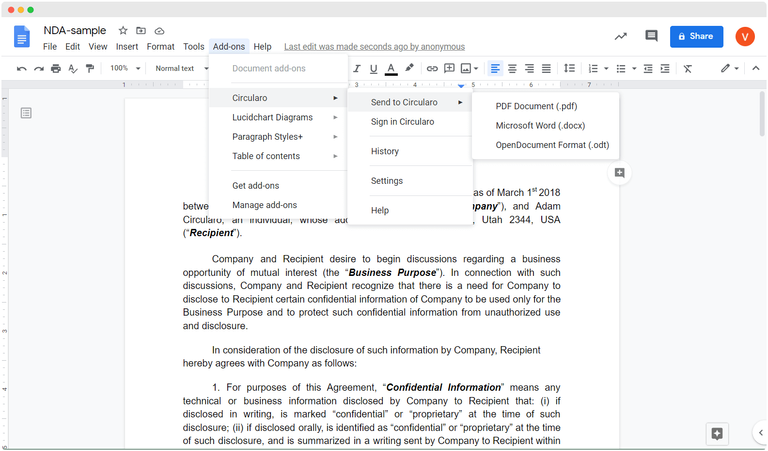
Click on Add-ons, navigate to Circularo to view available options, select Send to Circularo
-
Choose the format of the document (.pdf, .docx, .odt)
-
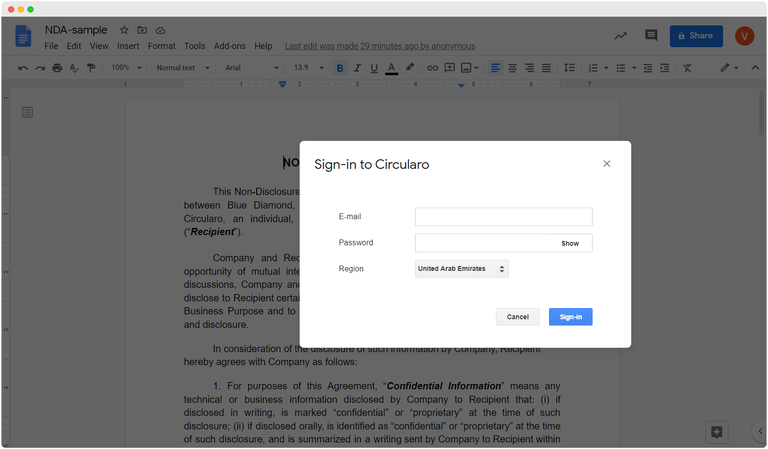
A pop-up asking for the credentials to sign in to Circularo will be displayed
-
Google Add-on
-
Once the document has been successfully uploaded to Circularo. you’ll see a Document has been archived successfully alert.
-
The document can then be viewed in Circularo and digitally signed
Sign in Circularo
-
Open the document you would like to send to Circularo.
-
Click on Add-ons, navigate to Circularo to view available options, select Sign in Circularo
-
Log in to Circularo
-
You will be taken to Circularo and given a choice of the main signing options based on who has to sign the document to start the eSigning process